The Best Cold Email Outreach Tools for Sales Teams in 2026



Anya Vitko
Contents
- What Is a Cold Email Outreach Tool?
- Why Does Your Sales Team Need a Cold Email Outreach Tool?
- What to Look for in a Cold Email Outreach Tool
- The Best Cold Email Outreach Tools in 2026
- How to Choose the Right Cold Email Outreach Tool for Your Team
- Cold Email Outreach Best Practices to Maximize Your Tool’s ROI
- Free Cold Email Outreach Tools: Are They Worth It?
- Finding the Right Tool for Smarter Cold Outreach
- Cold Email Outreach Tool FAQs
Cold email is one of the highest-ROI sales channels available. But most reps are leaving that ROI on the table. They’re sending generic messages, skipping follow-ups, and tracking nothing. Then they wonder why reply rates hover around 1–2%.
Here’s the uncomfortable truth: the problem usually isn’t your offer or your prospect list. It’s that you’re doing manually what your competitors are doing automatically. While you’re copying and pasting follow-up emails into a new tab, other reps are running automated sequences, getting real-time alerts when prospects engage, and personalizing outreach at scale all without leaving their inbox.
The gap between average and top-performing sales reps often comes down to one thing: tooling. The right cold email outreach tool handles the heavy lifting so you can focus on conversations that actually close deals.
This guide covers the best cold email outreach tools available in 2026: what each one does, who it’s best for, and how to pick the right one for your workflow. Whether you’re an SDR working a quota or a founder doing your own outbound, there’s a tool here for you.
TL;DR
- Cold email outreach tools automate sequences, track engagement, and personalize messages at scale without adding complexity to your day.
- 80% of sales require at least five follow-ups, but most reps stop after one or two. The right tool closes that gap automatically.
- Yesware is the top pick for reps and small teams who want to start fast: it installs in 60 seconds directly inside Gmail or Outlook, with a free plan and no IT setup required.
What Is a Cold Email Outreach Tool?
A cold email outreach tool is software that helps sales professionals send, automate, track, and optimize emails to prospects they haven’t previously contacted. These platforms are built specifically for B2B sales outreach, not mass marketing blasts.
That distinction matters. Tools like Mailchimp or Constant Contact are designed for large opted-in audiences: newsletters, announcements, promotional campaigns. Cold email tools are built for 1:1 or small-batch outreach where personalization, deliverability, and timing are everything.
Most cold email tools work in one of two ways. Some are standalone platforms where you log in and manage outreach separately from your inbox. Others, like Yesware, are inbox-native, meaning they live directly inside Gmail or Outlook and add sales capabilities to the tool you’re already using all day.
Key things a good cold outreach tool handles:
- Automating multi-touch follow-up sequences
- Tracking opens, clicks, and attachment views in real time
- Personalizing emails at scale using merge fields and templates
- Integrating with your CRM to keep records clean
- Providing analytics to show what’s working and what isn’t
A quick note on compliance: dedicated cold email platforms are also built with CAN-SPAM and GDPR requirements in mind, including automatic unsubscribe handling and opt-out management. If you’re doing outbound at any scale, using the right tool isn’t just more efficient — it keeps you on the right side of the law.
Why Does Your Sales Team Need a Cold Email Outreach Tool?
According to Salesforce, teams using sales engagement platforms generate significantly more pipeline activity than those relying on manual outreach alone. That gap compounds over time. Here’s why cold email software makes a material difference:
- No visibility into what’s working. Without email tracking, you’re sending into a black box. You don’t know if your subject line is the problem or your call to action. Email and attachment tracking shows opens, clicks, and reply rates at the template level so you can double down on what converts and cut what doesn’t.
- Manual follow-ups get dropped. Most deals require five or more touchpoints. Nobody remembers to follow up that many times manually — especially when managing 50+ active prospects. Automated sequences ensure every prospect gets the right message at the right interval, without relying on memory or sticky notes.
- Generic emails don’t convert. “Hi [First Name], I wanted to reach out…” lands in the trash. Personalization at scale — using merge fields for company name, job title, recent news, or mutual connections — lifts reply rates significantly. Cold email tools make this easy.
- Reps waste too much time on admin. HubSpot research shows sales reps spend roughly 21% of their day writing emails. Pre-built templates and automation tools give that time back, so reps can focus on actual selling.
- Managers lack coaching data. Without activity tracking and engagement analytics, it’s impossible to see which reps are sending what, which templates are performing, or where deals are stalling. Good cold email tools surface this data without requiring reps to log anything manually.
Sales enablement tools like Yesware address all five of these problems directly inside Gmail or Outlook. There’s no new software to learn, no complex setup, just sales capabilities layered into the inbox you’re already in.
What to Look for in a Cold Email Outreach Tool
Not all cold email software is built the same. Some tools are designed for agencies sending thousands of emails per day. Others are built for individual reps who want to work smarter without adding tools to their stack. Before you commit to anything, here’s what to evaluate.
Must-Have Features
| Feature | Why It Matters |
|---|---|
| Email tracking (opens, clicks) | Know when prospects engage so you can follow up at exactly the right moment — while you’re still top of mind. |
| Automated email sequences | Ensures consistent multi-touch follow-up without manual effort. Most replies come on follow-up 3 or 4, not the first email. |
| Personalization and mail merge | Dynamic fields for name, company, role, and custom variables. Personalized emails consistently outperform generic ones. |
| CRM integration | Syncs activity back to Salesforce or your CRM of choice automatically — no double data entry, no records falling through the cracks. |
| A/B testing | Test subject lines and body copy variants with real data. What you think will work and what actually works are often different things. |
| Real-time notifications | Get alerted the moment a prospect opens your email or clicks a link. That’s your signal to follow up while the context is fresh. |
| Deliverability tools | Email warm-up, custom tracking domains, and sender reputation monitoring keep your emails out of spam and in front of prospects. |
| Analytics and reporting | Campaign-level, template-level, and rep-level data so you know exactly what’s driving results — and what isn’t. |
Nice-to-Have Features
Depending on your workflow and team size, these additional features can add real value:
- LinkedIn integration or true multi-channel sequencing (email + social + phone)
- AI-assisted email writing and subject line suggestions
- One-click meeting scheduling links built into emails
- Team template libraries with sharing and permissions
- Attachment and presentation tracking (know when prospects view your deck)
- Mobile notifications for on-the-go visibility
If you’re just getting started, prioritize the must-haves. The nice-to-haves are easy to layer in once you’ve established a baseline process.
The Best Cold Email Outreach Tools in 2026
Here are the top cold email outreach tools on the market today, evaluated for features, ease of use, pricing, and fit across different team sizes and use cases.
1. Yesware — Best Cold Email Outreach Tool for Sales Reps Who Live in Their Inbox
Yesware is the go-to cold email outreach tool for individual sales reps, SDRs, AEs, and small sales teams who want to do smarter outreach without adding complexity to their workflow. It works directly inside Gmail and Outlook — no new software to log into, no migration, no learning curve. You install it in about 60 seconds and start using it immediately.
What makes Yesware different from most cold email tools is its inbox-native model. You’re not managing outreach in a separate platform and then switching back to email. Everything happens where you already work: inside your inbox.
Key features:
- Real-time email tracking — Know the moment a prospect opens your email, clicks a link, or views an attachment. Get notified instantly so you can follow up while you’re top of mind. Yesware users report following up up to 50% faster as a result.
- Automated email campaigns — Build multi-touch sequences with personalized templates that send automatically. No lead gets forgotten, and no follow-up gets dropped.
- Email templates — Save your best-performing emails and reuse them in one click. Teams can share templates across the group, which means new reps ramp faster and everyone sends consistent, professional messages.
- Attachment and presentation tracking — See when a prospect opens a PDF or views a deck you sent, not just whether they opened the email.
- Meeting scheduler — Let prospects book time directly from your email, cutting out the back-and-forth scheduling that kills momentum.
- Salesforce integration — Automatically sync email activity, opens, and replies to Salesforce. No manual logging, no gaps in your CRM records. You can also manage Salesforce tasks directly from your inbox, keeping your pipeline up to date without switching tabs.
- Reporting and analytics — Template reports, campaign reports, and activity reports give both reps and managers a clear view of what’s working.
Best for: Individual reps, SDRs, AEs, small to mid-size sales teams, founders doing outbound
Pricing: Free plan available (no credit card required). Paid plans start at $15/user/month. See full pricing details.
One thing to know: Yesware is built for quality, personalized outreach, not for bulk email blasting at enterprise scale. If you’re looking to spray thousands of cold emails per day from rotating domains, it’s not designed for that. But if you want a tool that makes every rep more effective with every email they send, it’s hard to beat.
2. Lemlist — Best for Personalized Visual Outreach
Lemlist built its reputation on email personalization that goes beyond merge fields. It lets you embed personalized images and videos directly in cold emails — for example, a screenshot of a prospect’s LinkedIn profile with your message overlaid on top. For sales teams that want to stand out visually, it’s a strong option.
Key features:
- Image and video personalization in cold emails
- Multi-channel sequences: email, LinkedIn, and phone steps in one flow
- Built-in email warm-up tool (Lemwarm) for deliverability
- AI email writing assistant
Best for: Sales teams that want to differentiate their outreach visually and run multi-channel sequences
Pricing: Starts at approximately $59/month. No free plan, but a free trial is available.
One thing to know: The learning curve is noticeably steeper than simpler tools. For reps who want quick setup and straightforward email sequences, it can feel like more tool than necessary.
3. Mailshake — Best for Simple, High-Volume Cold Email Campaigns
Mailshake focuses on keeping cold email simple. The interface is clean, setup is fast, and the core features — sequences, templates, A/B testing — work well for teams that don’t need a lot of customization.
Key features:
- Email sequence automation with A/B testing
- Clean, beginner-friendly interface
- Phone dialer add-on for multi-channel outreach
- Lead catcher to surface interested prospects automatically
Best for: SMBs and individual reps running straightforward cold email campaigns without complex requirements
Pricing: Starts at approximately $58/month. No free plan.
One thing to know: Analytics are more basic compared to platforms like Outreach or even Yesware’s team-level reporting. It’s a strong tool for execution, less strong for optimization.
4. Reply.io — Best AI-Powered Cold Email Outreach Tool
Reply.io leans heavily into AI. It includes an AI email assistant for drafting and optimizing cold emails, a chatbot (Jason AI) that can handle early-stage prospect conversations automatically, and true multi-channel sequences that span email, LinkedIn, SMS, WhatsApp, and phone calls.
Key features:
- AI email writing and sequence optimization
- Multi-channel sequencing: email, LinkedIn, SMS, WhatsApp, calls
- Jason AI chatbot for automated prospect engagement
- Email validation and warm-up tools
Best for: Sales teams that want AI-assisted outreach and are running campaigns across multiple channels simultaneously
Pricing: Starts at approximately $60/month. Free trial available.
One thing to know: The platform has a lot of features, which means it can feel complex to get started with. Onboarding takes more time compared to simpler tools.
5. Outreach.io — Best Enterprise Cold Email Outreach Tool
Outreach is a full-scale sales engagement platform built for enterprise teams with dedicated RevOps support. It goes well beyond cold email — covering deal management, forecasting, conversation intelligence, and AI-powered insights across the entire sales cycle.
Key features:
- Enterprise-grade sales engagement and sequence management
- Deep CRM integrations (Salesforce, HubSpot, and others)
- AI-powered deal intelligence and forecasting
- Conversation intelligence and call recording
Best for: Large enterprise sales teams with RevOps support and complex tech stacks
Pricing: Custom pricing. Typically $100 or more per seat per month.
One thing to know: Implementation is a significant undertaking. For small teams or individuals, the complexity and cost are difficult to justify. This is a platform for organizations with the resources to configure and manage it properly.
6. SalesHandy — Best Free Cold Email Outreach Tool for High Volume
SalesHandy is one of the more affordable options in the category and offers one of the more capable free tiers. On paid plans, it allows unlimited email accounts — which makes it particularly attractive for agencies managing outreach across multiple clients.
Key features:
- Unlimited email accounts on paid plans
- Email warm-up, sequence automation, and tracking
- Unified inbox for managing multiple accounts
- Free plan with core tracking features
Best for: Agencies, freelancers, and budget-conscious teams running high-volume outreach
Pricing: Free plan available. Paid plans start at approximately $36/month.
One thing to know: The UI is less polished than tools like Yesware or Lemlist, and customer support response times can lag. It gets the job done at a low price point but is not the most refined experience.
7. Instantly.ai — Best for Cold Email Deliverability at Scale
Instantly.ai is built around one core problem: getting cold emails delivered at high volume without landing in spam. It supports unlimited sending accounts, built-in warm-up, and inbox rotation — which makes it a favorite among agencies and lead gen teams sending thousands of emails per day.
Key features:
- Unlimited sending accounts and inbox rotation
- Built-in email warm-up for every account
- Strong deliverability-focused analytics dashboard
- AI-assisted email writing
Best for: Agencies and teams running high-volume outbound prospecting where deliverability is the primary concern
Pricing: Starts at approximately $37/month.
One thing to know: Instantly is more of a standalone sending platform than an inbox-native tool. It’s optimized for volume and deliverability, but the in-inbox workflow experience is more limited compared to tools built around rep productivity.
8. Apollo.io — Best All-in-One Prospecting + Cold Email Tool
Apollo combines a massive contact database (275M+ contacts) with cold email sequencing, making it the strongest option for teams that need prospecting data and outreach in a single platform. You can find prospects, verify their email addresses, and launch a sequence — all in one tool.
Key features:
- 275M+ contact database with search and filtering
- Built-in email verification and enrichment
- Cold email sequences and tracking
- Generous free plan with monthly credits
Best for: Teams that need both prospecting data and outreach automation and don’t want to manage two separate tools
Pricing: Free plan available. Paid plans start at approximately $49/month.
One thing to know: Data quality varies by industry and region. The outreach features are functional but less refined than dedicated cold email tools — teams with large contact databases often pair Apollo for prospecting with a dedicated tool like Yesware for the actual outreach.
Comparison Table: Best Cold Email Outreach Tools at a Glance
Pricing as of mid-2025. Verify current plans directly with each provider before purchasing.
| Tool | Best For | Free Plan | Starting Price | Inbox-Native | AI Features |
|---|---|---|---|---|---|
| Yesware | Individual reps, small teams | Yes | $15/user/mo | Gmail + Outlook | Yes |
| Lemlist | Visual personalization | No (trial) | ~$59/mo | No | Yes |
| Mailshake | Simple high-volume | No | ~$58/mo | No | Limited |
| Reply.io | AI + multichannel | No (trial) | ~$60/mo | No | Yes |
| Outreach.io | Enterprise teams | No | Custom | No | Yes |
| SalesHandy | Budget / high-volume | Yes | ~$36/mo | No | Limited |
| Instantly.ai | Deliverability at scale | No | ~$37/mo | No | Limited |
| Apollo.io | Prospecting + outreach | Yes | ~$49/mo | No | Yes |
How to Choose the Right Cold Email Outreach Tool for Your Team
The comparison table above tells you what each tool does. But the harder question is: which one is right for your specific situation? Here’s a practical framework for making that call.
Step 1: Define Your Use Case and Volume
Start by getting clear on what you’re actually trying to accomplish.
- Are you an individual rep doing your own outbound, or are you setting up a tool for a team of 5, 10, or 50?
- How many cold emails are you realistically sending per day? Under 100 is very different from 500+.
- Do you need a true multi-channel approach — email plus LinkedIn plus phone — or is email-only sufficient for your audience?
- Do you already have a prospecting data source, or do you need one built in?
It also helps to think through your sales cycle length and stages at this point. A longer, more complex cycle typically calls for a tool with stronger sequence automation and CRM syncing, while a shorter transactional cycle might only need basic tracking and templates.
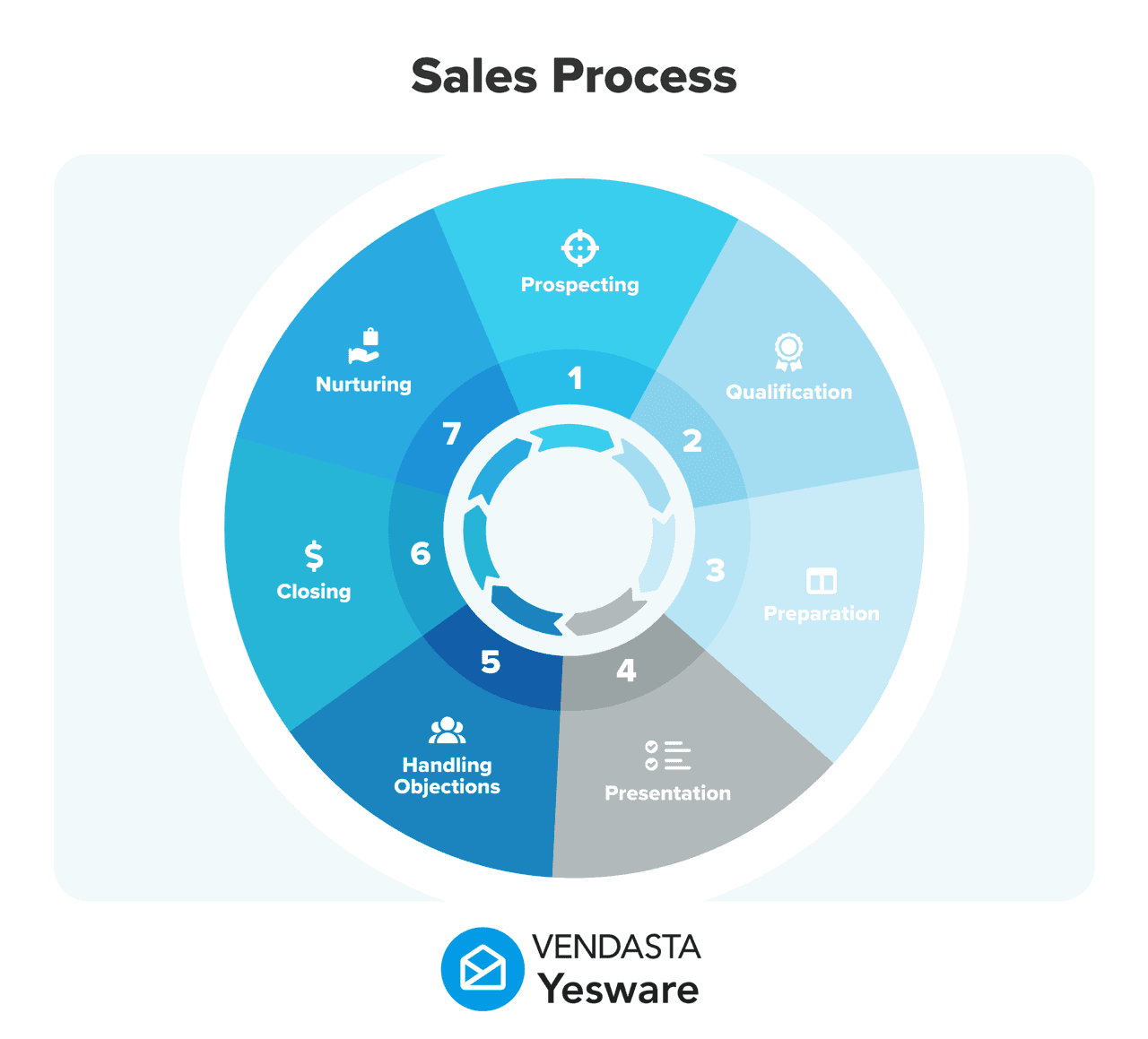
If you’re an individual rep or small team doing 50–150 emails per day and you want to start fast, an inbox-native tool like Yesware is almost always the right answer. If you’re an agency blasting thousands of emails across multiple client domains, you’re in Instantly.ai or SalesHandy territory.
Step 2: Check Your Tech Stack
Your cold email tool doesn’t exist in isolation. Before you commit, make sure it fits cleanly with what you’re already using.
- Email client: Are you on Gmail or Outlook? This matters significantly if you want an inbox-native tool. Yesware supports both natively. Many other tools require you to manage outreach outside your inbox. If you use Gmail automation already: filters, canned responses, scheduled sends, Yesware layers on top of those workflows rather than replacing them.
- CRM: If you’re on Salesforce, make sure the tool integrates directly and syncs activity automatically, not just contact data. Yesware’s Salesforce integration is native and bidirectional. If you’re on HubSpot or another CRM, verify native support before signing up.
- Data source: If you’re using Apollo or ZoomInfo for prospecting, you may not need a tool with a built-in database. A dedicated cold email tool will likely serve you better for the outreach side.
Step 3: Evaluate Deliverability Features
Deliverability is the part of cold email that most people underestimate until they discover their emails are landing in spam. When this happens, your entire outbound program can stall while you recover your sender reputation. The email deliverability guide covers the mechanics in detail, but here’s what to check when evaluating a tool.
When evaluating a tool, ask:
- Does it include an email warm-up feature, or do you need a separate tool for that?
- Does it support custom tracking domains? (Shared tracking domains increase spam risk significantly.)
- Does it offer sending throttles or daily limits to prevent triggering spam filters?
- What do users say about deliverability in reviews on G2 or Capterra?
For most reps sending under 150 emails per day from an established Gmail or Outlook account, deliverability is less of a concern. It becomes critical when you’re scaling volume, using newer domains, or running outreach for multiple clients.
Step 4: Start With a Free Trial or Free Plan
Most tools in this category offer either a free plan or a 14-day trial. Use it.
Don’t evaluate a tool based on a demo. Set it up yourself, run a small sequence of 20–50 prospects, and pay attention to:
- How long it actually takes to get from signup to sending your first email
- Whether the template and sequence builder is intuitive or requires documentation to figure out
- How clear the reporting is. Can you quickly see what’s working?
- Whether support is responsive if you hit a wall
Yesware’s free plan is a good place to start for this reason. There’s no credit card required, setup takes under 2 minutes inside your existing Gmail or Outlook account, and you get real email tracking and templates from day one. It’s the fastest way to experience what inbox-native cold email tooling actually feels like.
Cold Email Outreach Best Practices to Maximize Your Tool’s ROI
A cold email outreach tool is only as good as how you use it. The reps who see the best results aren’t necessarily the ones with the most expensive tool — they’re the ones who’ve combined the right tool with the right habits. Here are seven practices that consistently separate high-performing outreach from average results.
1. Personalize Beyond the First Name
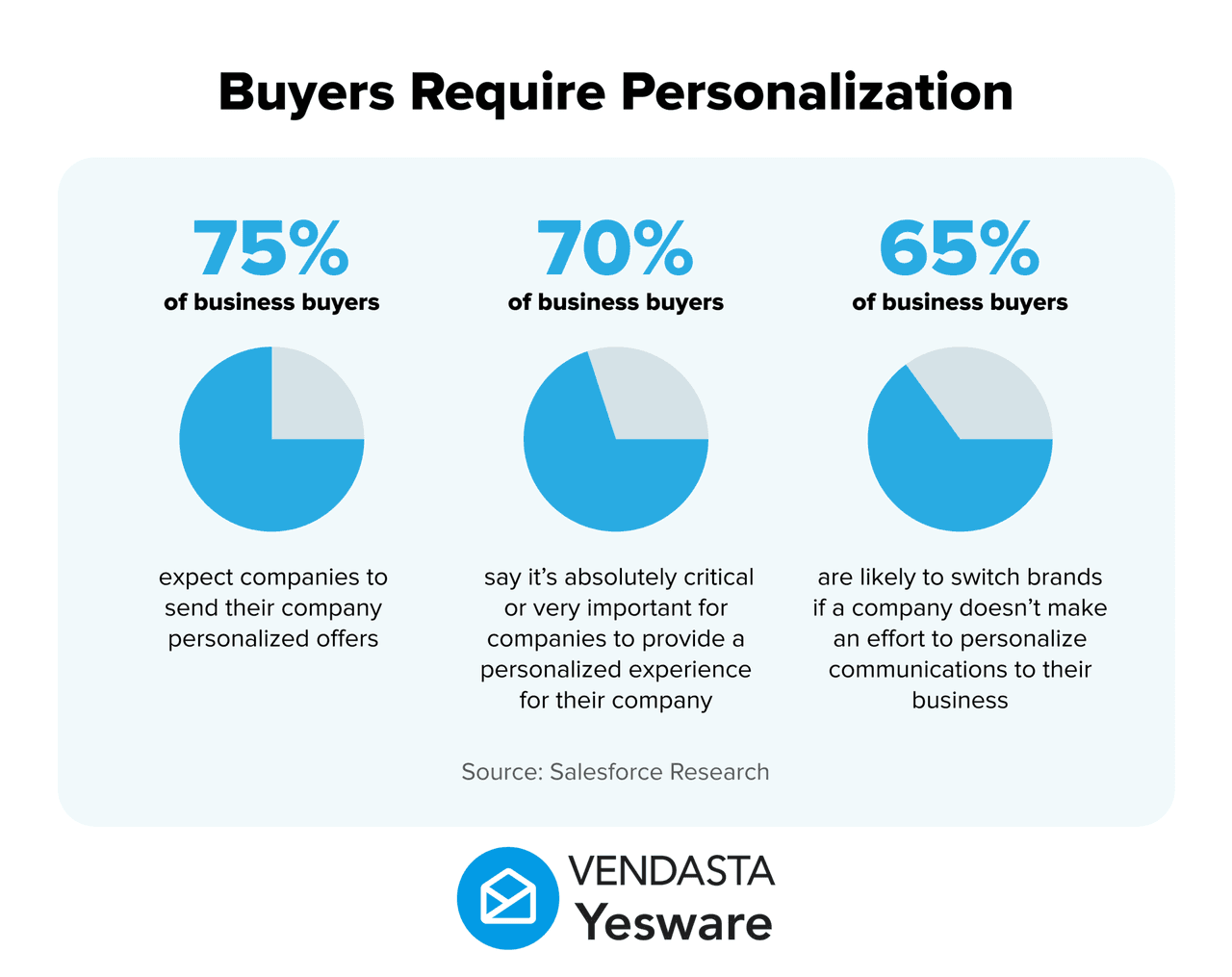
First-name personalization is table stakes. Prospects don’t notice it anymore. What actually gets attention is specificity: mentioning their company’s recent funding, referencing a role change, or tying your message to a challenge specific to their industry. To do this well, it helps to understand who the actual decision maker is before you write a single word. Tools like Yesware support custom merge tags so you can include these details at scale without writing every email from scratch.
2. Keep Subject Lines Under 50 Characters
Shorter subject lines have higher open rates, particularly on mobile where preview text gets cut off fast. As a benchmark, aim for 6–10 words that are direct and specific rather than clever. Then A/B test at least two variants per campaign. What you assume will perform well and what actually performs well are often different.
3. Follow Up at Least 4–6 Times
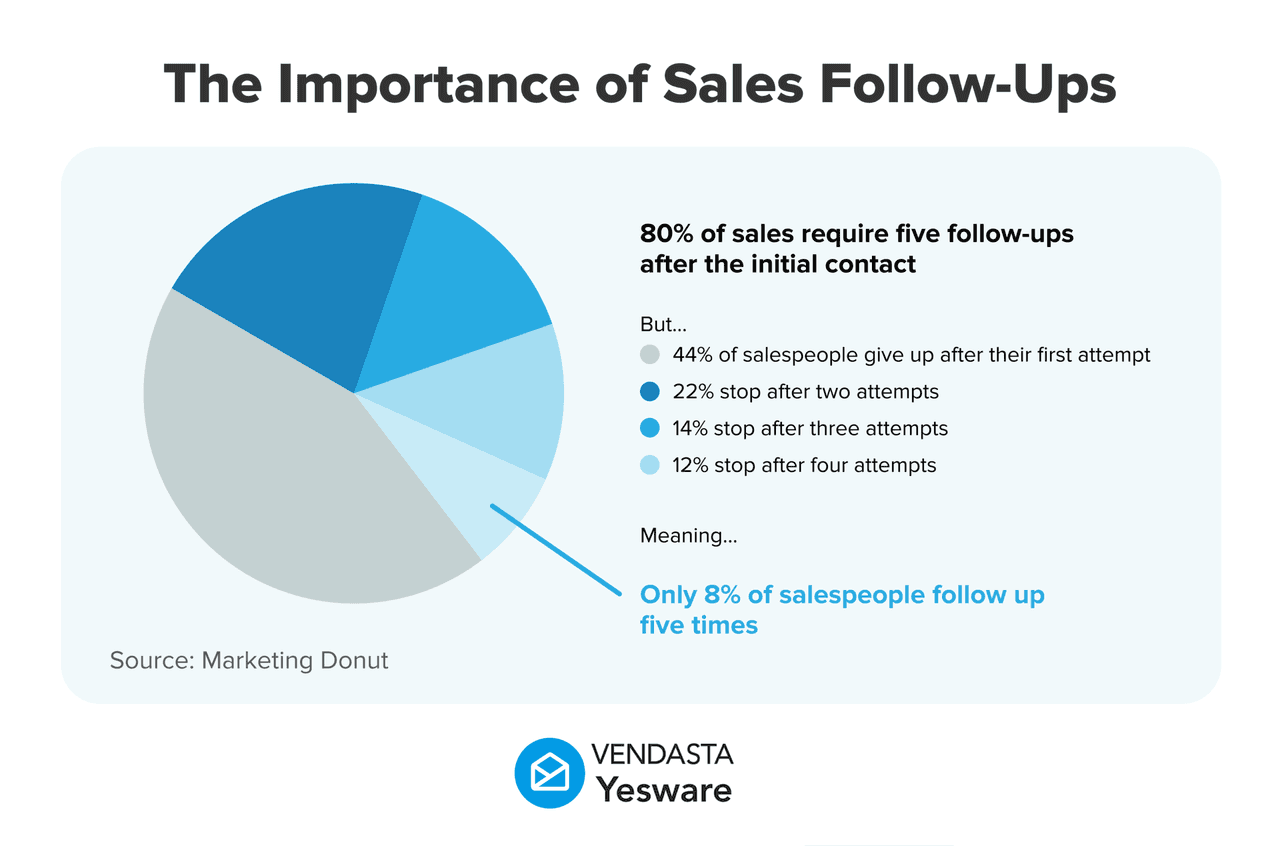
Research consistently shows that 80% of sales require at least five follow-ups. Most reps send one or two and give up. The majority of replies, including positive ones, come from follow-up emails, not the original message. Review the most common sales follow-up email mistakes before you build your sequence, then automate so this happens without you having to think about it.
4. Send at the Right Time
Tuesday through Thursday between 8 and 10 am in the prospect’s local time zone is a reliable starting point based on Yesware’s email timing data and broader industry research. That said, optimal send times vary by industry and role. Use your tool’s analytics to test timing variants and identify what works for your specific audience.
5. Track and Iterate on Templates
Running cold email without tracking template performance is like running paid ads without conversion data. Your cold email tool should show you open rates, reply rates, and click rates at the template level. Review this data regularly, identify your top-performing messages, and build new sequences around the patterns that work. Yesware’s template reports make this straightforward at both the individual and team level.
6. Handle Opt-Outs Immediately
Always include an easy way for prospects to unsubscribe. Beyond being a legal requirement under CAN-SPAM, ignoring opt-out requests burns your sender reputation and guarantees spam reports. Good cold email tools handle this automatically when a prospect unsubscribes, they’re removed from all active sequences immediately.
If you want to put these practices to work right away, below is a collection of proven cold email templates you can start using today.
 10 Cold Email Formulas That Just Plain WorkSee how B2B sales professionals are using these cold email templates to engage more prospects, fill the top of their funnel and build more sales pipeline faster.
Free Cold Email Outreach Tools: Are They Worth It?
One of the most common questions from reps and founders getting started with cold outreach is whether there’s a decent free option — or whether you have to pay to get anything useful.
The answer is yes, free tools exist and some of them are genuinely useful. But understanding what you actually get on a free plan (and what you give up) matters before you commit to one.
| Tool | Free Plan Includes | Key Limitations |
|---|---|---|
| Yesware | Email tracking (opens, clicks), limited templates, basic reporting | Campaign limits; team features and advanced reporting locked to paid plans |
| Apollo.io | 50 email credits/month, basic sequence automation | Limited data credits; restricted access to full contact database |
| SalesHandy | Email open tracking, limited follow-up automation | SalesHandy branding on emails; limited sequences |
Free plans work well as a starting point — particularly for individual reps testing the waters or founders doing their first outbound campaigns. You can validate whether cold email is a viable channel for your business before spending anything.
That said, free plans have real constraints. Most cap the number of emails or sequences you can run, limit team collaboration features, and don’t include A/B testing. Once you’re running sequences consistently, the ROI on a paid plan is easy to calculate: if one meeting booked from a cold email sequence is worth even $500 in pipeline, a $15/month tool that helps you book more of them pays for itself immediately.
Yesware’s free plan is among the more generous in this category. You get real email tracking and templates with no credit card required — a solid way to experience the core value before committing to anything.
Finding the Right Tool for Smarter Cold Outreach
Cold email, done well, is still one of the most cost-effective ways to generate pipeline. But the difference between a 1% reply rate and a 10% reply rate almost always comes down to how you’re approaching it and what tools you’re using to execute.
The tools in this guide each serve a different kind of team. High-volume agencies need deliverability infrastructure. Enterprise teams need deep CRM integration and forecasting. But for the majority of sales reps, SDRs, and founders doing outbound, the best cold email outreach tool is the one that gets out of your way — one that fits inside your inbox, is fast to set up, and gives you clear data on what’s actually working.
That’s the case Yesware makes. It doesn’t try to be a platform that replaces your whole sales stack. It makes your inbox smarter, automates the follow-up work that gets dropped, and surfaces the engagement signals you need to follow up at the right moment. If you want to go deeper on how the underlying approach works, this overview of Yesware’s features walks through the full picture. For reps who want to start seeing results quickly without a lengthy implementation, it’s the obvious place to start.
Start using Yesware free! Connect it to Gmail or Outlook in under 2 minutes, no credit card required.
Cold Email Outreach Tool FAQs
1. What is a cold email outreach tool?
A cold email outreach tool is software that helps sales professionals send, automate, track, and optimize emails to prospects they haven’t previously contacted. These tools typically include email tracking, automated follow-up sequences, personalization features, and analytics — all designed to improve reply rates and book more meetings.
2. What is the best cold email outreach tool for salespeople?
The best cold email outreach tool depends on your team size and workflow, but Yesware is consistently top-rated for individual sales reps and small teams. It installs in 60 seconds inside Gmail or Outlook, requires no IT setup, and includes email tracking, campaign automation, and real-time engagement notifications without the complexity of enterprise platforms.
3. Is there a free cold email outreach tool?
Yes — several tools offer free plans with real utility. Yesware offers a free plan that includes email tracking and templates with no credit card required. Apollo.io and SalesHandy also have free tiers. Free plans are well-suited for individual reps starting out; paid plans unlock full automation, A/B testing, and team-level analytics.
4. How does cold email outreach software work?
Cold email outreach software connects to your Gmail or Outlook account and adds capabilities like automated follow-up sequences, open and click tracking, merge-field personalization, and campaign analytics. You create templates, build a sequence, upload your prospect list, and the tool handles sending, timing, and tracking automatically.
5. What’s the difference between a cold email tool and a marketing email tool?
Cold email tools like Yesware are built for 1:1 or low-volume B2B sales outreach to prospects who haven’t opted in. Marketing email tools like Mailchimp are built for mass campaigns to large opted-in subscriber lists. Cold email tools prioritize deliverability, sales workflow integration, and personalization at the individual prospect level — not newsletter design or broadcast volume.
6. How do I improve reply rates with a cold email outreach tool?
Focus on four things: personalize beyond the first name, keep subject lines under 50 characters, automate at least 4–6 follow-ups, and A/B test your messaging. With Yesware, you can track open and reply rates at the template level and quickly identify which messages are resonating — making continuous optimization straightforward rather than guesswork. Understanding what motivates your buyers before you write your emails also makes a meaningful difference in reply rate.
7. Do I need a CRM to use a cold email outreach tool?
No — most cold email tools work independently of a CRM. That said, CRM integration dramatically improves pipeline visibility. Yesware integrates natively with Salesforce, automatically syncing email activity, opens, and replies without manual logging. If you don’t yet have a CRM, Yesware’s built-in activity and engagement reports provide a lightweight alternative.
8. What are the best cold email outreach tools for small businesses?
The best tools for small businesses are ones that are affordable, fast to set up, and don’t require dedicated technical support. Yesware (inbox-native, free plan available, $15/user/month paid), Mailshake (simple and beginner-friendly), and Apollo.io (prospecting data plus outreach) are consistently strong choices. Yesware is particularly well-suited because it requires no new software to learn — it works inside the inbox your team is already using.
9. How many cold emails should I send per day?
Most deliverability experts recommend a ceiling of 50–100 cold emails per day from a single inbox, especially from a domain that’s less than a year old. Sending above this threshold risks triggering spam filters and damaging your sender reputation. Cold email outreach tools like Yesware help you pace sends intelligently and surface engagement data so you focus effort on warm prospects, not cold ones.
10. How do I know if my cold email outreach tool is actually working?
Track three core metrics: open rate (a healthy benchmark for targeted outreach is 40–60%), reply rate (5–15% is a solid target for well-personalized campaigns), and meetings booked. Yesware’s reporting dashboard shows all of this at the campaign, template, and rep level — so you can quickly identify what’s driving results and where to optimize for more pipeline. For a broader view of how these metrics fit into your overall performance, the key sales metrics every rep should track is a useful reference.
Get sales tips and strategies delivered straight to your inbox.
Yesware will help you generate more sales right from your inbox. Try our Outlook add-on or Gmail Chrome extension for free, forever!
Related Articles


Anya Vitko
Anya Vitko


Jenny Keohane
Sales, deal management, and communication tips for your inbox