Email Open Tracking: How It Works and the Best Tools for Sales Teams


Anya Vitko
Contents
- What Is Email Open Tracking?
- Why Email Open Tracking Matters for Sales
- How Email Open Tracking Works (The Technical Breakdown)
- How to Track Email Opens in Gmail
- How to Track Email Opens in Outlook
- The Best Email Open Tracking Tools for Sales Teams (2026 Roundup)
- Email Open Tracking Best Practices for Sales Reps
- Email Open Tracking Privacy: What Sales Reps Need to Know
- Email Open Tracking for Sales Teams: A Manager’s Perspective
- Start Tracking, Stop Guessing
- Email Open Tracking FAQs
Most sales reps send follow-up emails based on gut instinct. They hit send, wait, hear nothing, and either follow up too early (annoying the prospect) or give up entirely (assuming silence means “no”). The frustrating reality is that silence rarely means “no”. Often, the prospect opened the email, read it twice, and hasn’t responded yet.
Every day without visibility costs you deals. Reps who know that a prospect opened their proposal email three times in one afternoon follow up differently than those flying blind. They call with confidence. They reference the right content. They reach out at the right moment — and they close more.
Email open tracking gives you that visibility. You get real-time alerts the moment a prospect opens your email, sees how many times they’ve read it, and learns what device they’re on. Sales reps who use email tracking tools see up to 26% higher reply rates, according to Yesware data. It’s one of the highest-leverage tools in a sales rep’s toolkit, and it takes about 60 seconds to set up.
Email open tracking is a technique that notifies you in real time when a recipient opens your email, so you can follow up at exactly the right moment.
This guide covers how email open tracking works, why it matters for your quota, how to set it up in Gmail and Outlook, and the best tools available in 2025.
TL;DR
- Email open tracking uses an invisible pixel embedded in your email to record when, how often, and where a recipient opens your message.
- Top tools like Yesware, HubSpot Sales, Mailtrack, and Mixmax integrate directly with Gmail and Outlook — most take under a minute to install.
- The result: smarter, better-timed follow-ups, fewer wasted touches, and more closed deals.
 Know exactly when prospects engageGet real-time open and click notifications, follow up at the perfect moment, and close more deals without leaving your inbox
What Is Email Open Tracking?
Email open tracking is a method of detecting when, how often, and sometimes where an email recipient opens your message \all without them needing to do anything on their end.
The most common mechanism is a tracking pixel: a tiny 1×1 transparent image embedded in the body of your email. When the recipient opens the email, their email client sends a request to load that image from a remote server. That server-side request is timestamped, logged, and sent back to you as a notification.
From the recipient’s perspective, nothing is visible. There’s no prompt to “accept” a read receipt. The tracking happens automatically in the background, the same way any image in an email is loaded.
Open tracking is sometimes compared to read receipts, but they’re fundamentally different. Read receipts require the recipient to click “send receipt,” meaning most people decline them. Tracking pixels require no recipient action at all.
Here’s how the process works, step by step:
- You send an email with a tracking pixel embedded (your email tracking tool handles this automatically).
- Your prospect opens the email — their email client requests the pixel from the tracking server.
- You receive an instant notification with the time of open, number of opens, device type, and approximate location.
Beyond open tracking, most sales-grade tools also offer link click tracking, which is a complementary signal that tells you when a prospect clicks a link inside your email.
Why Email Open Tracking Matters for Sales
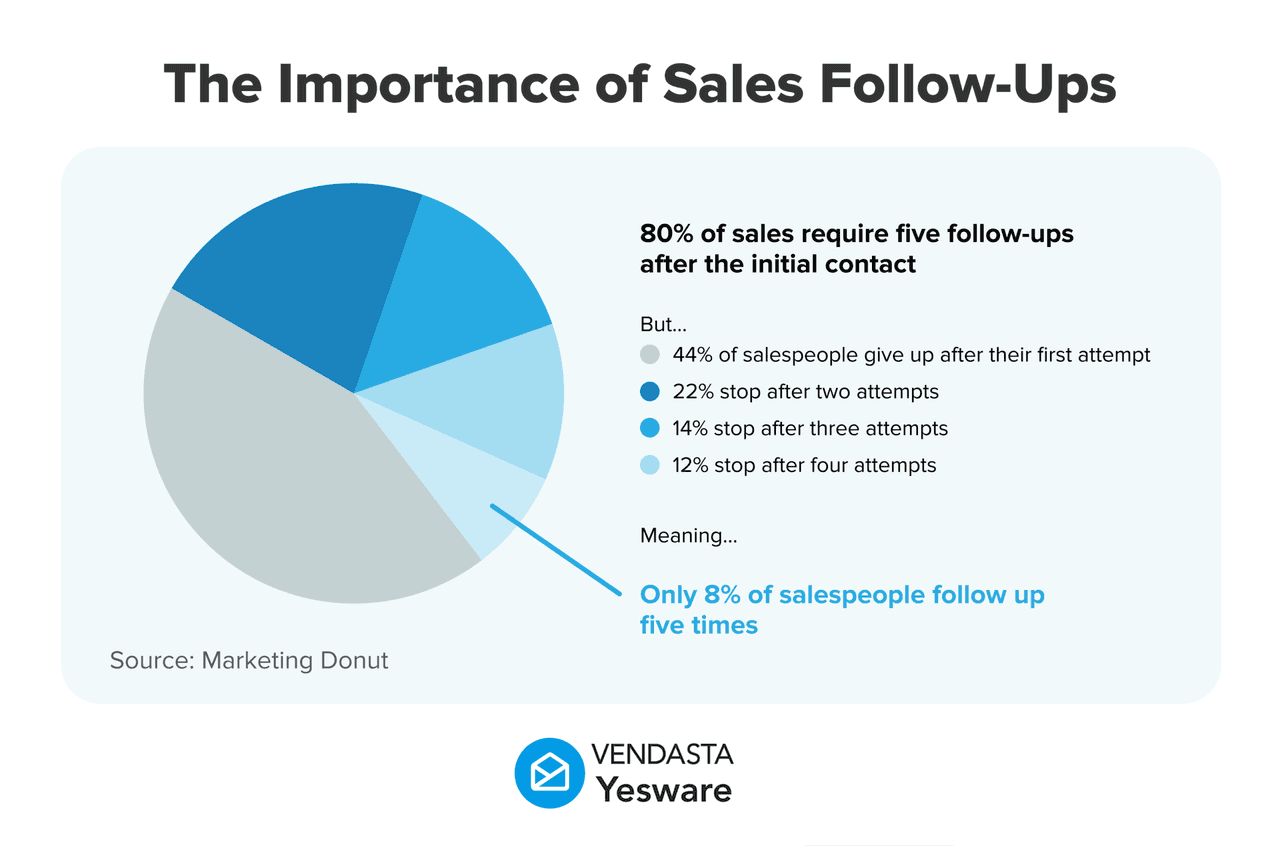
The biggest reason deals stall isn’t a bad pitch or weak pricing. It’s timing. According to HubSpot research, 44% of sales reps give up after just one follow-up, even though most deals require five or more touchpoints before a prospect responds.
Without tracking, you’re guessing. You don’t know if your email was opened and ignored, never opened at all, or read carefully three times by someone who’s genuinely interested. Each scenario calls for a completely different response.
Email open tracking closes that gap. Here’s how it directly impacts your sales results:
- Better follow-up timing. When you know a prospect just opened your email, you can follow up while the conversation is still top of mind — not three days later when they’ve forgotten who you are.
- Clearer buying signals. A prospect who opens your email five times in one afternoon is telling you something important. That’s the kind of signal that deserves a same-day call.
- Prioritized lead lists. Instead of working your pipeline alphabetically or by deal size, you work it by engagement. Prospects showing real interest rise to the top.
- Less time wasted on cold leads. If someone hasn’t opened a single email after six touches, that’s data. You can redirect your effort to warmer prospects or try a different channel.
- More confident conversations. Knowing a prospect recently engaged with your email gives you a natural, non-awkward reason to reach out — you’re following up, not cold-calling.
Yesware’s real-time desktop notifications alert you the moment a prospect opens your email or clicks a link, so you can follow up while you’re still relevant. Reps using Yesware report following up within minutes of an open — and converting those conversations at meaningfully higher rates. Teams that adopt email engagement tools consistently outperform those that don’t, with some attributing a 20–30% increase in revenue to improved follow-up strategies.
For a deeper look at how email engagement data translates into real sales results, download this ebook built from over three million tracked sales activities.
 Sales Engagement Data Trends from 3+ Million Sales ActivitiesLooking at millions of tracked email activity over the past few years, this ebook is filled with our top studies and findings to help sales teams accelerate results.
How Email Open Tracking Works (The Technical Breakdown)
If you want to use tracking data intelligently, it helps to understand what’s actually happening under the hood. Here’s the full picture.
The Tracking Pixel Explained
A tracking pixel is a 1×1 transparent GIF or PNG image embedded in the HTML of your email. It’s invisible to the naked eye. You wouldn’t notice it reading the email.
When the recipient opens the email, their email client issues an HTTP GET request to retrieve the image from a remote tracking server. That server logs the request, including:
- The exact time the email was opened
- How many times has it been opened
- The device type (mobile vs. desktop)
- The approximate geographic location (derived from IP address)
- The email client used (Gmail, Outlook, Apple Mail, etc.)
Think of it like a tiny invisible door sensor. The moment someone walks through (opens your email), the sensor fires and sends you an alert.
Your email tracking tool handles all of this automatically. You compose your email as normal, and the pixel is embedded by default. No coding required.
Email Link Tracking (Click Tracking)
Open tracking tells you the email was opened. Link tracking tells you what the prospect did next.
When you include a link in a tracked email, the tracking tool wraps that link through its own server. When the prospect clicks it, the click is logged before the browser redirects to the destination URL. The whole process is instantaneous from the recipient’s perspective.
For sales purposes, click data is often more valuable than open data. A prospect who clicked your pricing page link, your case study, or your calendar scheduling link is showing stronger buying intent than someone who just opened the email.
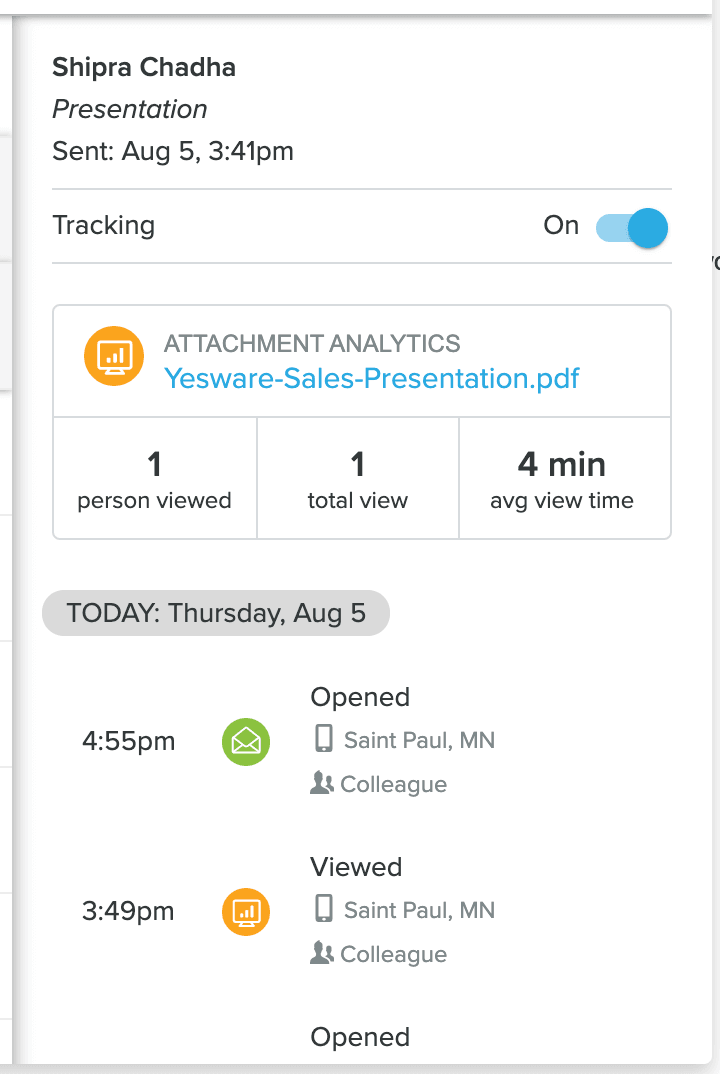
Beyond links, you can also track email attachments to see when prospects open a proposal, a deck, or any file you’ve sent. Yesware tracks opens, link clicks, and attachment views, giving you a complete engagement picture for every prospect.
What Data Does Email Open Tracking Capture?
Here’s a breakdown of the key data points available through most email tracking tools, and what each one tells you:
| Data Point | What It Tells You |
|---|---|
| Time of open | When the prospect is active — ideal window for a call or follow-up email |
| Number of opens | High open count signals strong interest; prioritize this prospect |
| Device type | Mobile opens may mean they’re on the go; desktop opens = likely at their desk |
| Location (city/region) | Confirms the prospect is at their office, or flags if they’re traveling |
| Link clicks | Strong intent signal — especially if they clicked pricing or a case study |
| Email client | Useful for formatting decisions (e.g., Apple Mail users may see rendering differently) |
How to Track Email Opens in Gmail
Gmail doesn’t offer native open tracking. To get real-time open notifications inside Gmail, you need a dedicated email tracking extension or add-on. Here are your options.
Using Yesware to Track Email Opens in Gmail (Recommended)
For sales teams, Yesware is the most complete option. It’s a full sales engagement platform that lives inside your Gmail inbox. You get open and click tracking, email templates for Gmail, automated campaigns, meeting scheduling, and Salesforce integration, all without ever leaving Gmail.
Here’s how to get set up:
- Go to yesware.com and sign up using your Google account — this connects your Gmail at the same time.
- Install the Yesware Chrome extension from the Chrome Web Store.
- Yesware is ready to use immediately inside Gmail. The whole setup takes about 60 seconds.
- Compose an email as usual. Yesware’s tracking is active by default, with a toggle per email if you want to turn it off for a specific send.
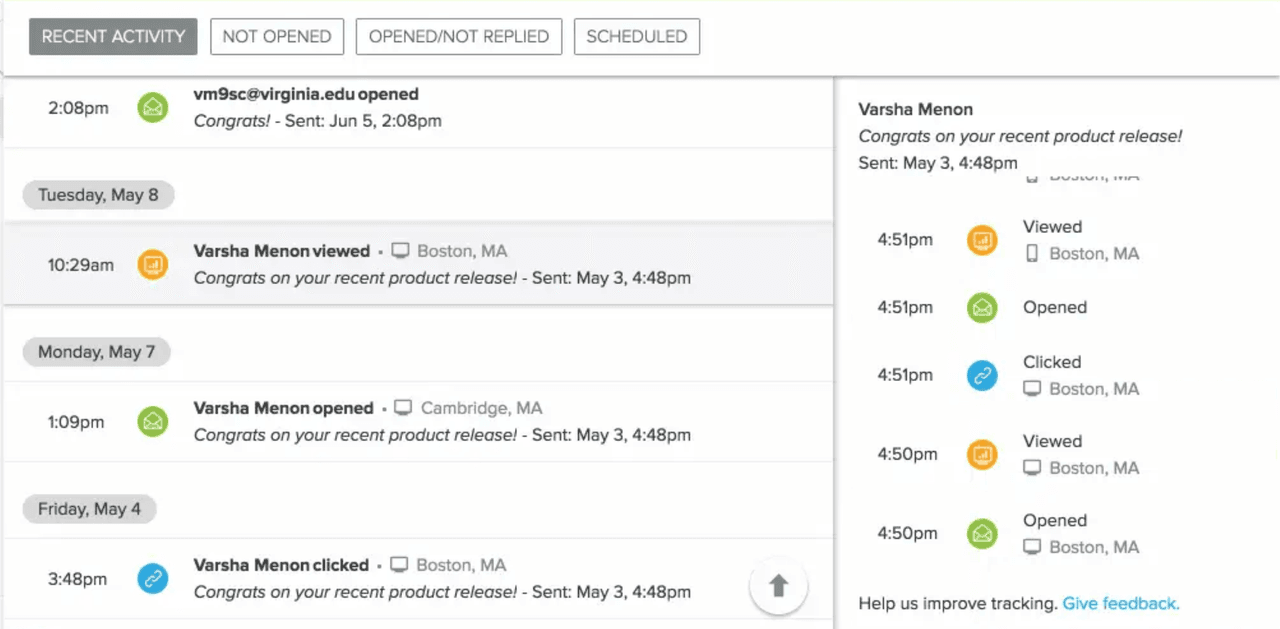
- Hit send. Yesware’s Activity Feed logs every open, click, and engagement event in real time.
Once installed, you’ll see real-time desktop notifications the moment a prospect opens your email or clicks a link. The Activity Feed shows you a full engagement history for each prospect — every open, every click, every touchpoint — in one place.
Other Options to Track Email Opens in Gmail
If you’re looking for a basic tracker or aren’t ready to commit to a paid plan, here are a few alternatives worth knowing about:
- Mailtrack: Free and lightweight, with unlimited tracking in Gmail. The main catch is a “Sent with Mailtrack” watermark on the free plan, which can look unprofessional in outbound sales. No CRM integration or sequences.
- HubSpot Sales (free tier): Good option if you’re already using HubSpot CRM. Tracks opens and clicks and logs them to your CRM automatically. The free plan caps the number of emails you can track per day and reserves real-time notifications for paid tiers.
- Mixmax: A more advanced Gmail tool with tracking, sequences, polls, and scheduling. Solid for power users, but the setup is more involved and pricing scales quickly for teams.
None of these gives you the full sales engagement workflow. Templates with performance analytics, multi-touch campaigns, and team-level reporting that Yesware provides out of the box. You can also explore Gmail automation options to see how tracking fits into a broader productivity setup.
How to Track Email Opens in Outlook
Microsoft Outlook has a built-in read receipt feature, but it has a significant limitation: it asks the recipient to manually click “Send Receipt” before you’re notified. Most people ignore or decline that prompt, making it unreliable for sales. A dedicated email tracking tool gives you silent, automatic tracking that doesn’t depend on the recipient doing anything.
Using Yesware to Track Email Opens in Outlook
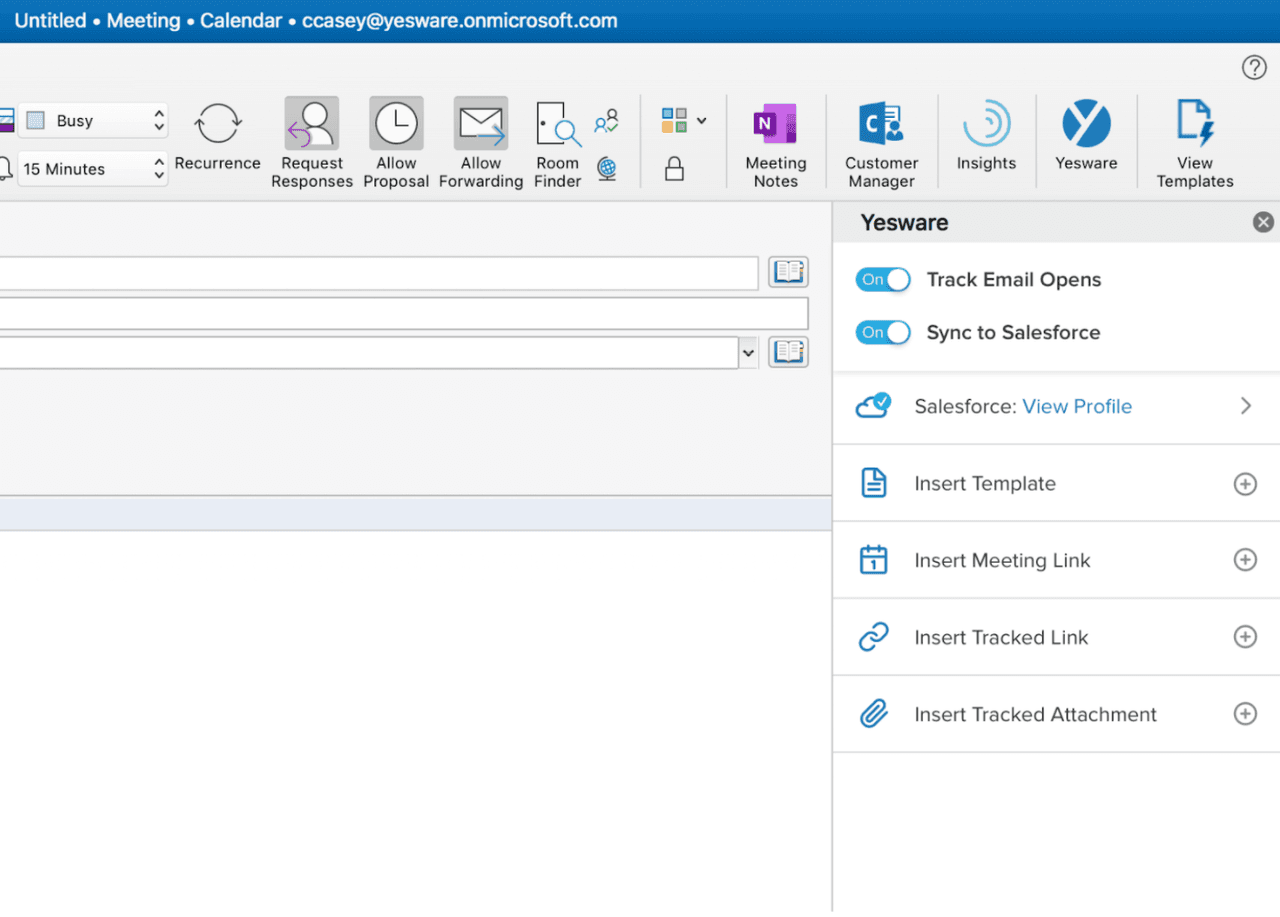
Yesware offers a dedicated Outlook add-in that works with Outlook Desktop 2016 or later, and Outlook on the Web using Chrome, Edge, or Internet Explorer. Here’s how to set it up:
- Go to yesware.com and sign up for an account.
- Install the Yesware Outlook add-in from the Microsoft AppSource or via the Yesware website.
- Connect your Microsoft or Outlook account when prompted.
- Once the add-in is loaded, click on any email in your inbox. You’ll see a blue “Y” appear on the right side of your Outlook ribbon — click it to open the Yesware Sidebar.
- Compose and send emails as you normally would. Tracking is automatic.
- Monitor opens, clicks, and engagement in the Yesware Sidebar inside Outlook.
Everything works inside your existing Outlook environment — real-time open notifications, link click tracking, template performance data, and Salesforce sync — all accessible from the Yesware Sidebar without switching tools.
Native Outlook Read Receipts vs. Third-Party Email Tracking
Here’s a side-by-side comparison that makes the difference clear:
| Feature | Outlook Read Receipts | Yesware for Outlook |
|---|---|---|
| Requires recipient action | Yes | No |
| Silent background tracking | No | Yes |
| Real-time notifications | No | Yes |
| Link click tracking | No | Yes |
| CRM integration | No | Yes (Salesforce & others) |
| Mobile notifications | No | Yes |
| Cost | Free (built-in) | Free plan available; paid plans from $15/user/month |
The Best Email Open Tracking Tools for Sales Teams (2026 Roundup)
Not all email trackers are built for sales. Basic tracking tools tell you when someone opened your email. Sales-grade tools go further — they integrate with your CRM, surface engagement trends over time, trigger follow-up sequences, and give managers visibility into team performance. Here are the top options across different use cases.
1. Yesware — Best Email Tracker for Sales Teams
Yesware is built specifically for salespeople, not marketers or general users. It lives inside Gmail and Outlook, requires no IT setup, and gives you everything you need to track engagement and act on it from the first open to the closed deal.
- Best for: Sales reps and teams who want open tracking plus a full sales engagement workflow in one tool
- Platforms: Gmail, Outlook (Windows, Mac, and 365 web)
- Standout features: Real-time open and click notifications (desktop and mobile), Activity Feed with full per-prospect engagement history, email templates with open and click analytics, multi-touch automated campaigns, native Salesforce integration, and team-level reporting
- Why it stands out: Yesware connects the tracking signal to the follow-up action. You don’t just see that someone opened your email — you can trigger a template, book a meeting, or launch a campaign from the same inbox in one click
- Pricing: Free plan available; paid plans starting at $15/user/month
2. HubSpot Sales Hub — Best for HubSpot CRM Users
If your team is already running on HubSpot CRM, the Sales Hub is a natural fit. Open and click tracking logs automatically to contact records, and the email timeline view gives you a clean history of every touchpoint.
- Best for: Teams already invested in the HubSpot ecosystem
- Platforms: Gmail, Outlook
- Key features: Open and click tracking, CRM auto-logging, email templates, and meeting scheduler
- Limitations: Free tier caps tracked emails per day and holds real-time notifications behind a paid plan. Sales sequences require a paid tier.
3. Saleshandy — Best for Cold Email Outreach
Saleshandy is designed for high-volume cold outbound. It handles open, click, and reply tracking across multi-step sequences and includes an email warm-up tool to protect email deliverability.
- Best for: SDR teams running large cold outreach campaigns
- Key features: Sequence automation, open and reply tracking, email warm-up, A/B testing
- Limitations: Less suited to in-inbox 1:1 sales conversations; not as tightly integrated with Gmail or Outlook as Yesware
4. Mailtrack — Best Free Option for Individual Reps
Mailtrack is the simplest Gmail tracking tool available. It’s free, easy to install, and works immediately with no configuration. For individual reps who just want basic open notifications and aren’t ready to pay for a full tool, it’s a reasonable starting point.
- Best for: Solo reps or anyone testing email tracking for the first time
- Key features: Unlimited open tracking in Gmail, double-checkmark open indicators, real-time notifications
- Limitations: The free plan adds a “Sent with Mailtrack” watermark to every email, which can appear unprofessional. No CRM integration, no sequences, no team features, and no Outlook support.
5. Mixmax — Best for Gmail Power Users
Mixmax packs a lot into Gmail: open and click tracking, sequences, scheduling polls, email enhancements, and engagement scoring. It’s a strong option for reps who want a feature-rich Gmail experience beyond basic tracking.
- Best for: Individual reps who live in Gmail and want advanced workflow features
- Key features: Open and click tracking, sequences, one-click scheduling, polls and surveys in emails
- Limitations: Setup is more involved than Yesware or Mailtrack, and pricing escalates quickly as teams grow. No Outlook support.
6. Outreach / Salesloft — Best for Enterprise Sales Teams
Outreach and Salesloft are full sales engagement platforms used by large enterprise sales organizations. Email tracking is included, but it’s one small component within a much broader (and more expensive) platform that also covers dialing, forecasting, and revenue intelligence.
- Best for: Enterprise teams with dedicated RevOps and IT resources
- Key features: Full sales engagement suite including email tracking, calls, sequences, and forecasting
- Limitations: Heavy implementation requirements, long onboarding timelines, and pricing well beyond SMB budgets. For sales teams that want Outreach-level intelligence without the complexity, Yesware covers the core use case at a fraction of the cost.
Email Tracker Comparison at a Glance
| Tool | Gmail | Outlook | Real-Time Alerts | CRM Sync | Free Plan | Best For |
|---|---|---|---|---|---|---|
| Yesware | Yes | Yes | Yes | Yes (Salesforce) | Yes | Sales teams |
| HubSpot Sales | Yes | Yes | Paid only | Yes | Yes (limited) | HubSpot users |
| Saleshandy | Yes | Yes | Yes | Yes | Yes (limited) | Cold outreach |
| Mailtrack | Yes | No | Yes | No | Yes (watermark) | Solo reps |
| Mixmax | Yes | No | Yes | Yes | Yes (limited) | Gmail power users |
| Outreach/Salesloft | Yes | Yes | Yes | Yes | No | Enterprise teams |
Email Open Tracking Best Practices for Sales Reps
Installing a tracking tool is the easy part. Getting real results from the data is where most reps leave performance on the table. Here are four practices that separate average trackers from reps who consistently use engagement data to close more deals.
Respond to Signals, Don’t Stalk Them
When a prospect opens your email three or four times in a single afternoon, that’s a meaningful signal. But calling them within 30 seconds of every open can come across as intrusive, and in the worst case, it reveals that you’re watching their inbox, which erodes trust.
The better approach: use repeat opens as a prioritization signal, not an immediate trigger.
A practical rule of thumb:
- If a prospect opens your email three or more times within 24 hours, move them to the top of your call list for that day.
- When you do reach out, reference the content, not the tracking. “I wanted to follow up on the proposal I sent” lands much better than anything that hints you’ve been monitoring their activity.
- Pair a high open count with other signals (they clicked a link, they’re close to a deal stage deadline) before making it a priority call.
It’s also worth reviewing common sales follow-up email mistakes to make sure your timing and messaging are working together, not against each other.
Use Time-of-Open Data to Optimize Send Times
Every time a prospect opens your email, you’re collecting data about when they’re active. Over a few touchpoints, patterns emerge. If a specific contact consistently opens emails between 7 and 9 in the morning, that’s your send window for future messages.
This matters more than most reps realize. Research from HubSpot consistently shows that Tuesday through Thursday mornings see higher email engagement than other times of the week. But individual prospect data will always be more useful than industry averages.
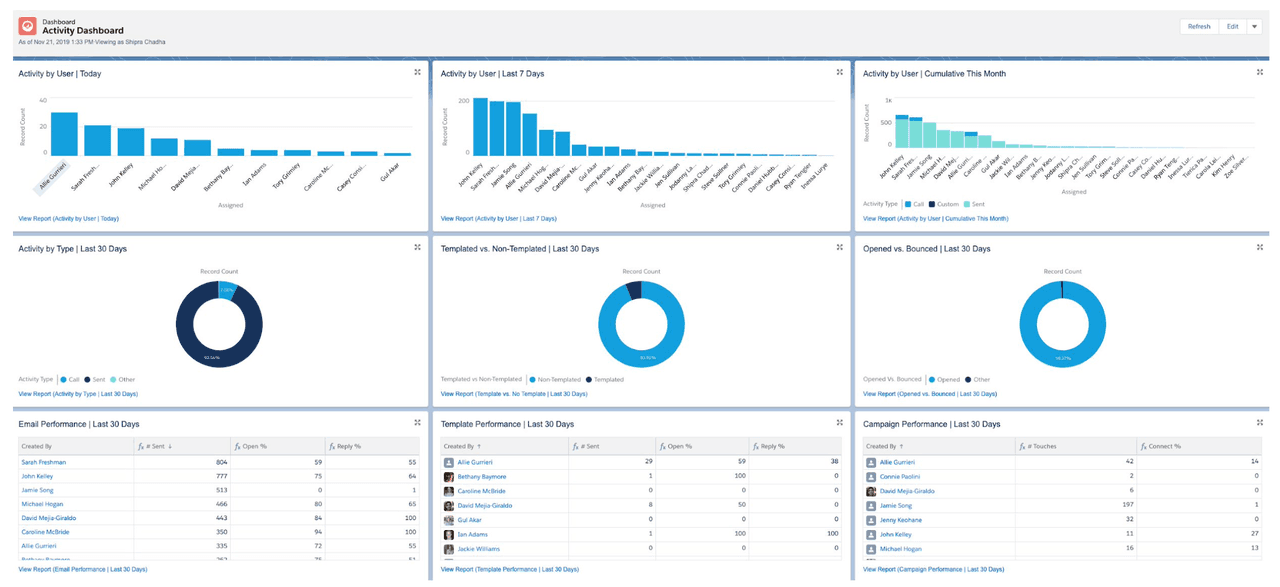
For managers, Yesware’s team reporting aggregates engagement patterns across your entire rep team. If your best-performing reps are sending at 8 am and your lowest performers are sending at 3 pm, that’s a coaching insight that shows up in the data.
Track Template Performance, Not Just Individual Emails
Most reps rely on a small set of go-to email templates: an intro email, a follow-up, a breakup message. Without tracking, you have no idea which ones actually drive opens and replies and which ones consistently get ignored.
Yesware’s template analytics surface open rate, click rate, and reply rate per template across every rep on your team. That data tells you what’s working and gives you a foundation for A/B testing subject lines. A 5% lift in open rate across 100 sends equals five more conversations. At scale, that compounds quickly.
One useful framework for prioritizing templates: weight open rate at 40% and reply rate at 60%. A template with a 60% open rate but 3% reply rate is a weak template with a strong subject line; the message isn’t landing. A template with a 40% open rate and 25% reply rate is actually your most valuable asset.
Pair Email Tracking with Your CRM
Tracking data is only as useful as the system it lives in. An open notification that disappears from your desktop is easy to forget. The same open, logged automatically to a Salesforce contact record alongside the prospect’s deal stage, previous emails, and call history, tells a much richer story.
Yesware syncs all email activity — opens, clicks, replies, and sends — directly to Salesforce without requiring manual input. You can manage Salesforce tasks and activity tracking alongside your email engagement data, keeping your pipeline up to date without switching between tools.
Use tracking data to make better CRM decisions: if a prospect hasn’t opened a single email after six touches, update their status, try a different channel, or remove them from the active sequence. Don’t let your pipeline get clogged with contacts who have shown no engagement signal.
Email Open Tracking Privacy: What Sales Reps Need to Know
As email privacy protections have evolved, open tracking has become more nuanced. Here’s what you need to understand to interpret your tracking data accurately and use it responsibly.
Apple Mail Privacy Protection (MPP), introduced in iOS 15 and macOS Monterey, pre-fetches email content, including tracking pixels, in the background before the user even opens the message. This inflates open rates for Apple Mail users, because the pixel fires when Apple’s server fetches it, not when the recipient actually reads the email. According to Litmus, Apple Mail accounts for a significant share of email opens globally, so this is not a minor edge case.
What this means practically: if you’re seeing unusually high open rates for a contact who uses Apple Mail, treat those opens as directional rather than definitive. Click tracking is unaffected by MPP and remains your most reliable engagement signal for Apple Mail users.
Gmail image proxying is a separate consideration. Gmail routes images through Google’s own servers, which means the location data you get from a Gmail open reflects Google’s server location, not the prospect’s physical location. Don’t use Gmail location data to assume a prospect is at their desk in Chicago.
On legal questions: In most B2B sales contexts, one-to-one email tracking pixels are not treated as cookies under GDPR or CAN-SPAM, and don’t generally require consent disclosures. That said, compliance requirements vary by region, industry, and company policy. If you’re emailing contacts in the EU at scale, consult your legal team before drawing conclusions about what’s required. This guide does not constitute legal advice.
The practical upshot: treat open data as a directional signal and click data as your strongest indicator of genuine prospect intent. Used together and interpreted with context, they’re still one of the most valuable engagement data sources available in sales.
Email Open Tracking for Sales Teams: A Manager’s Perspective
Email tracking is a tool for individual reps, but it’s also a coaching and performance management tool for managers. The aggregate data across your team tells a story that’s hard to see at the individual level.
Here’s how to use team-level tracking data effectively:
- Low open rates, rep-wide: This is a subject line problem, not a messaging problem. The email never got a fair read. Work with the rep on subject line testing before reviewing the body copy.
- High open rates but low reply rates: The subject line is working; the message isn’t landing. Review the template, the offer, or the call to action.
- High open rates, high reply rates, low conversion: The email is working. The problem is downstream: qualification, demo quality, or pricing conversations.
- Very low send volume but decent engagement rates: The rep is being selective but not proactive enough. Coaching opportunity around activity levels.
Yesware’s team dashboard gives managers real-time visibility into every rep’s email activity, open rates, reply rates, and template usage without requiring manual reporting or rep updates. You see the data as it happens, not filtered through a weekly summary. Tracking these patterns over time feeds directly into the key sales metrics that matter most for forecasting and quota attainment.
A simple weekly review framework for sales managers using Yesware:
- Review the top-performing templates from the past week. Which ones had the best open and reply rates? Share those with the team.
- Flag underperforming sequences. Any sequence with open rates below your benchmark warrants a subject line review.
- Build a priority call list based on prospects who opened emails multiple times this week. These are your warmest leads heading into the next week.
This takes 15 minutes. Done consistently, it compounds into meaningful performance improvements across your team over a quarter.
Start Tracking, Stop Guessing
Email open tracking turns one of the most opaque parts of sales — what happens after you hit send — into a clear, actionable signal. You know who’s engaged. You know when to follow up. You know which messages are working and which ones aren’t. That visibility changes how you sell, how you prioritize your pipeline, and ultimately, how often you close.
For sales reps and teams who want to go beyond basic open tracking, Yesware brings all of that together in one place: real-time notifications, click tracking, template performance data, automated campaigns, and CRM sync — all from inside Gmail or Outlook, with no IT setup and no learning curve. It’s the difference between a tracker and a complete sales engagement system.
Ready to see who’s opening your emails and follow up at exactly the right moment? Start your free Yesware trial and turn your inbox into a deal-closing machine.
Email Open Tracking FAQs
1. What is email open tracking?
Email open tracking is a method of detecting when an email recipient opens your message. It works by embedding a tiny invisible pixel in the email body. When opened, the pixel loads from a remote server and notifies you in real time. Sales tools like Yesware make this seamless inside Gmail and Outlook with no setup beyond a quick install.
2. How does email open tracking work technically?
A 1×1 transparent tracking pixel is embedded in your email’s HTML. When the recipient opens the email, their client sends an HTTP GET request to load the pixel from a tracking server. That request is logged with a timestamp, device type, location, and open count. The whole process is automatic and invisible to the recipient.
3. Can I track email opens in Gmail for free?
Yes. Tools like Mailtrack and HubSpot Sales offer free Gmail open tracking, though both have limitations. Mailtrack adds a signature watermark on the free plan; HubSpot caps the number of tracked emails per day. Yesware’s free plan includes email tracking inside Gmail with no recipient-facing watermark and no daily send cap on tracked emails.
4. How do I track email opens in Outlook?
Outlook’s native read receipts in Outlook require the recipient to manually approve the notification, making them unreliable for sales. For automatic, silent tracking, use a dedicated add-in like Yesware for Outlook. It installs in a few minutes and logs every open, click, and reply directly in your Outlook sidebar, with real-time desktop notifications included.
5. Is email open tracking accurate?
For most email clients, open tracking is reliable. The main exceptions are Apple Mail (where Mail Privacy Protection can pre-load pixels and inflate open counts) and Gmail (which proxies images through Google’s servers, making location data imprecise). Click tracking is generally more accurate than open tracking and is a stronger indicator of genuine prospect intent.
6. Is email open tracking legal?
In most B2B sales contexts, one-to-one email tracking is legal and doesn’t require explicit consent under GDPR or CAN-SPAM. That said, requirements vary by region, industry, and company policy. If you’re sending tracked emails to EU contacts at scale, consult your legal or compliance team. This FAQ does not constitute legal advice.
7. What is the best email open tracker for sales reps?
For sales reps, Yesware is widely considered the strongest option because it combines real-time open and click tracking with templates, automated campaigns, and CRM sync. It works in both Gmail and Outlook, requires no IT setup, and gives managers team-level reporting — all without the cost or complexity of enterprise sales platforms.
8. How does email open tracking help with sales follow-up?
Tracking shows you when a prospect opens your email, how many times they’ve read it, and what device they’re on. That context tells you when and how to follow up. Yesware’s real-time notifications let you act within minutes of an open, reaching out while you’re still top of mind rather than following up based on a scheduled email reminder.
9. Does email open tracking work on mobile devices?
Yes. Most tracking tools, including Yesware, detect opens from both desktop and mobile email clients. You can typically see the device type in your tracking data. The main caveat is Apple Mail on iOS: Mail Privacy Protection can generate false mobile opens by pre-fetching email content before the user actually reads it.
10. What is the difference between email open tracking and link tracking?
Open tracking detects when a recipient opens your email using a tracking pixel. Link tracking detects when they click a link inside the email by routing the link through a tracking server. Both signals are useful — opens indicate interest, clicks indicate stronger intent. Yesware tracks both, giving you a complete view of how each prospect is engaging with your outreach.
Get sales tips and strategies delivered straight to your inbox.
Yesware will help you generate more sales right from your inbox. Try our Outlook add-on or Gmail Chrome extension for free, forever!
Related Articles


Anya Vitko
Anya Vitko


Jenny Keohane
Sales, deal management, and communication tips for your inbox